Creating a Word document
Ask Aimee to create a report, letter, proposal, memo or other Word document. Describe the audience, purpose, sections and information to include. Aimee creates a structured DOCX file using the approved K3 letterhead, with automatically numbered headings, real bullet lists and Word tables where appropriate.
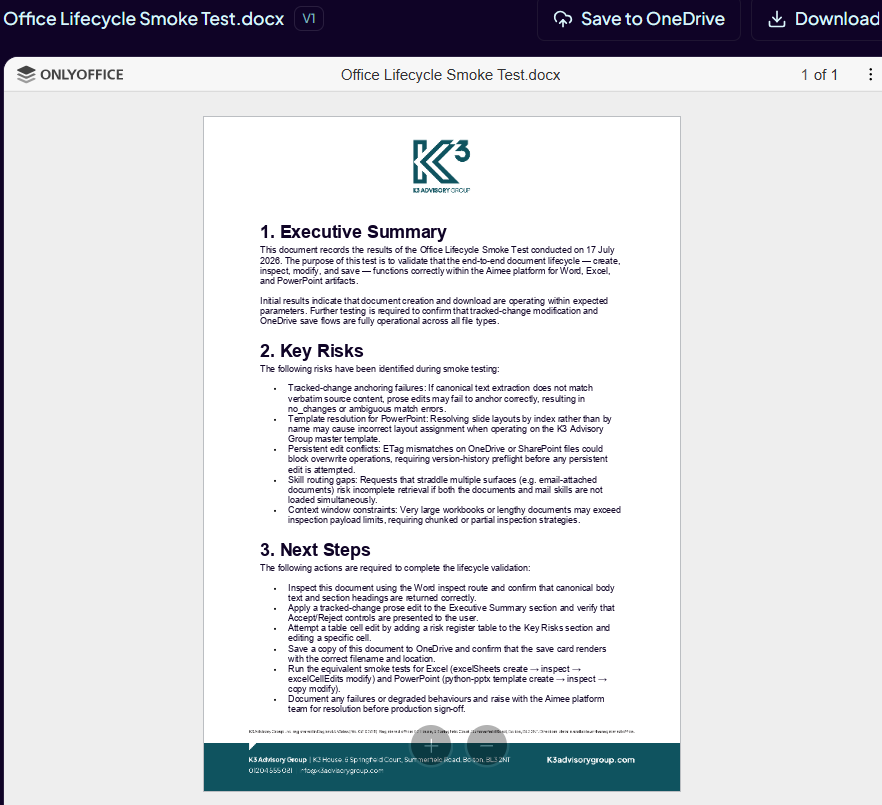
Example prompt: "Create a two-page client briefing in Word with an executive summary, three recommendations and a risks table."
Reading and checking a document
Ask Aimee to read, summarise or check an Aimee-managed Word document. Aimee reads the document's body text and tables so that follow-up edits can be anchored to the actual DOCX content.
Reviewing tracked changes
- Ask Aimee for a specific change to an editable Word document.
- Review the document edit action card that appears in the conversation.
- Choose Accept to apply a suggested change or Reject to discard it.
- Open the resulting document version and check the finished content.
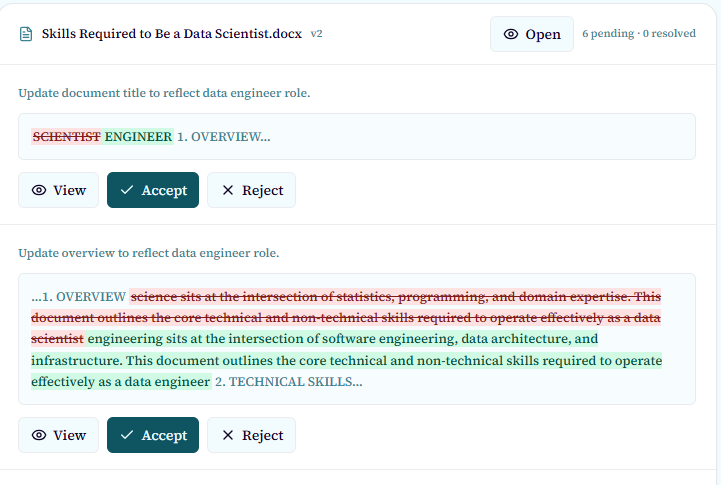
Suggested changes are non-destructive until you accept them. Each accepted edit creates a new version; rejecting a change leaves the document unchanged.
Downloading and saving to OneDrive
- Use Download on the file card or viewer to save the selected version locally.
- Use Save to OneDrive to copy the selected version to your personal OneDrive.
- If the document is already linked to OneDrive, Aimee may ask whether to Update linked OneDrive file with the new version.
- A linked-file update can offer Undo using version history after the update completes.
Current limitation
A generic Word export action is not available. Download the generated DOCX or use Save to OneDrive instead.